Thông báo mới nhất
Announcement: Upgrade to Delta-Neutral Mode in the Unified Trading Account
2026-08-28 07:30015
To make Delta-Neutral Mode available to more traders running funding-rate arbitrage, basis arbitrage, and similar strategies, Bitget has made the following upgrades to the feature:
What's New
1. No whitelist required — visible to all users
Previously, Delta-Neutral Mode was only available to whitelisted users. After the upgrade, all users can see the feature entry point in Trading Settings without applying for whitelist access.
2. Simplified into a single toggle under Advanced Mode
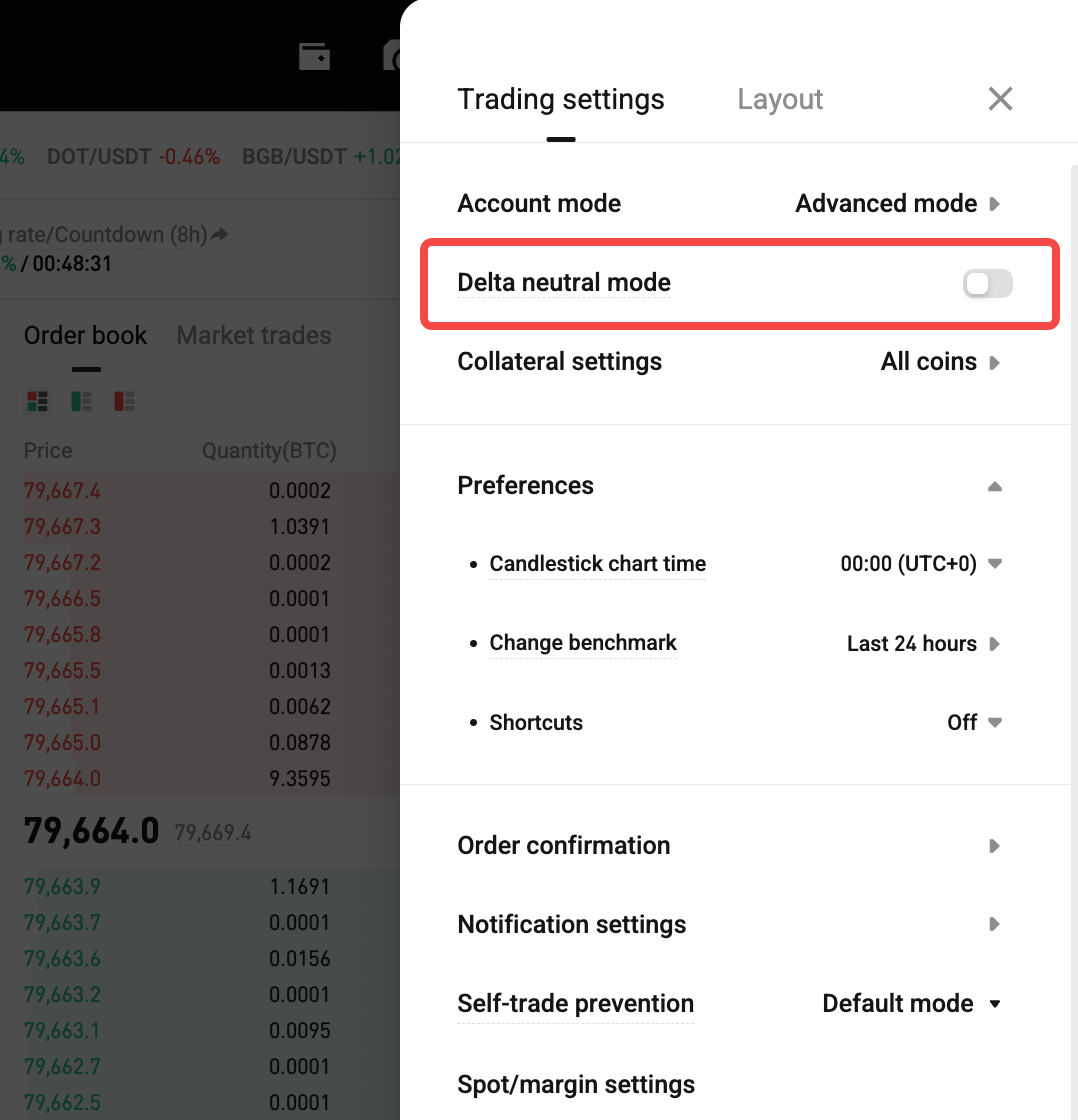
Delta-Neutral Mode is no longer a standalone account mode. It is now a toggle within Trading Settings under Unified Trading Account – Advanced Mode. The former "Delta-Neutral Mode" account mode option has been removed. To use this feature, switch to Advanced Mode first, then enable the toggle in Trading Settings.
3. Eligibility now determined by identity verification
When you tap to enable the toggle, the system verifies your account identity. Meeting any one of the following conditions is sufficient: VIP3 or above / Pro user / market maker / institutional lending user, etc. Demo trading is not subject to identity restrictions — all users can enable and try the feature in demo mode.
4. Isolated-margin positions can now be held at the same time
Previously, you had to close all isolated-margin futures positions and cancel all isolated-margin orders before enabling Delta-Neutral Mode. This restriction has been removed. You can now hold and trade isolated-margin futures positions while the toggle is enabled.
Please note: isolated-margin positions do not participate in Delta-Neutral calculations or ADL (Auto-Deleveraging) protection eligibility. Their ADL ranking follows the standard isolated-margin rules, regardless of whether the Delta-Neutral toggle is enabled.
5. Simplified criteria for qualifying as a hedged position
Previously, a position had to satisfy both an "account-level" and an "asset-level" condition at the same time to qualify as a hedged position and receive ADL ranking protection:
-
Account level: Account Delta-to-Equity Ratio ≤ 20%
-
Asset level: Net futures position of the asset / Total position of the asset ≤ 5%
After the upgrade, the account-level condition has been removed. Only the asset-level condition needs to be met: Net futures position of the asset / Total position of the asset ≤ 5%
Account-level metrics such as Account Delta and the Delta-to-Equity Ratio are no longer calculated. They are no longer shown on the trading page and are no longer used as criteria for determining hedged positions.
Collateral Settings
Once the Delta-Neutral toggle is enabled, collateral is fixed to all currencies and cannot be customized to mainstream currencies or a custom list (this rule remains unchanged).
Notice for Existing Users
If your account mode was already set to "Delta-Neutral Mode" before this upgrade:
-
As long as you do not manually switch your account mode, you may continue using it as before
-
Once you switch to a different account mode (Basic / Advanced / Isolated-Margin Mode), you will no longer be able to switch back to the legacy "Delta-Neutral Mode" account mode
-
If you need to continue using Delta-Neutral capabilities afterward, please switch to Advanced Mode and enable the new Delta-Neutral toggle in Trading Settings
-
App users: the Delta-Neutral toggle in Trading Settings will be available in an upcoming app version. Please update the app to the latest version once released, then enable the toggle from Trading Settings
How to Enable
-
Go to Trading Settings and switch your account mode to Advanced Mode
-
Find the "Delta-Neutral Mode" toggle in Trading Settings under Advanced Mode
-
Tap to enable it; the system will automatically verify your account identity
-
If the identity requirement is not met, you will see: "Your account does not meet the requirements to enable this feature. You must be VIP3 or above, or meet specific user eligibility criteria, to enable Delta-Neutral Mode."
FAQ
1. Do I need to close my positions before enabling Delta-Neutral Mode?
No, you don't.
2. My account doesn't meet the account-level condition for hedge eligibility — can I still get protection?
The account-level condition has been removed after the upgrade. A position only needs to meet the asset-level condition — "net position / total position ≤ 5%" — to qualify as a hedged position, regardless of your account's overall Delta-to-Equity Ratio.
3. Can isolated-margin positions receive Delta-Neutral protection?
No. Isolated-margin positions are excluded from the Delta-Neutral framework and are not included in the related calculations. Their ADL ranking follows the standard isolated-margin rules.
4. Does ADL ranking protection guarantee I won't be auto-deleveraged?
No. This protection mechanism only lowers a hedged position's ranking priority in the ADL queue. Auto-deleveraging can still occur under extreme market conditions.
5. I was previously on the "Delta-Neutral Mode" account mode — how does this affect my account?
If you have not manually switched account modes, you can continue using the legacy mode as before. However, once you switch away, you cannot switch back, and you will need to use the Delta-Neutral toggle under Advanced Mode going forward. App users must update to the latest version to see this toggle.
For more details, please see: How does Delta-Neutral Mode work in the Unified Trading Account? | Bitget Support Center
Risk Warning
Delta-Neutral Mode is designed to improve the trading experience for hedging strategies, but market volatility may still carry risk. Please participate in trading according to your own risk tolerance.
Tham gia Bitget, sàn giao dịch đa năng (UEX) lớn nhất thế giới
Đăng ký tài khoản Bitget ngay >>>
Điều này có hữu ích không?CóKhông
Chia sẻ