Bitget rToken Stock Transfer Explained: 4 Benefits Beyond Traditional Stock Trading
What if the U.S. stocks you already own could do more than sit in a traditional brokerage account? Imagine holding Nvidia, Apple, and a few ETFs while also trading cryptocurrencies on Bitget. Your investments are spread across different platforms, and using those stock holdings for crypto trading or borrowing isn't always straightforward. Selling them and moving the cash is one option, but what if you could bring the shares themselves into the crypto market?
That's the idea behind Bitget rToken Stock Transfer, launched on October 13, 2026. The service allows eligible investors to transfer more than 3,000 supported U.S. stocks and ETFs from traditional brokers to Bitget without selling them first. Once received and processed, the shares are automatically converted into rTokens, opening up additional possibilities for trading, borrowing, and managing capital. With broad asset coverage, a streamlined transfer process, and zero Bitget transfer-in fees, there's more to this service than simply moving stocks between accounts.
What Is Bitget rToken Stock Transfer?
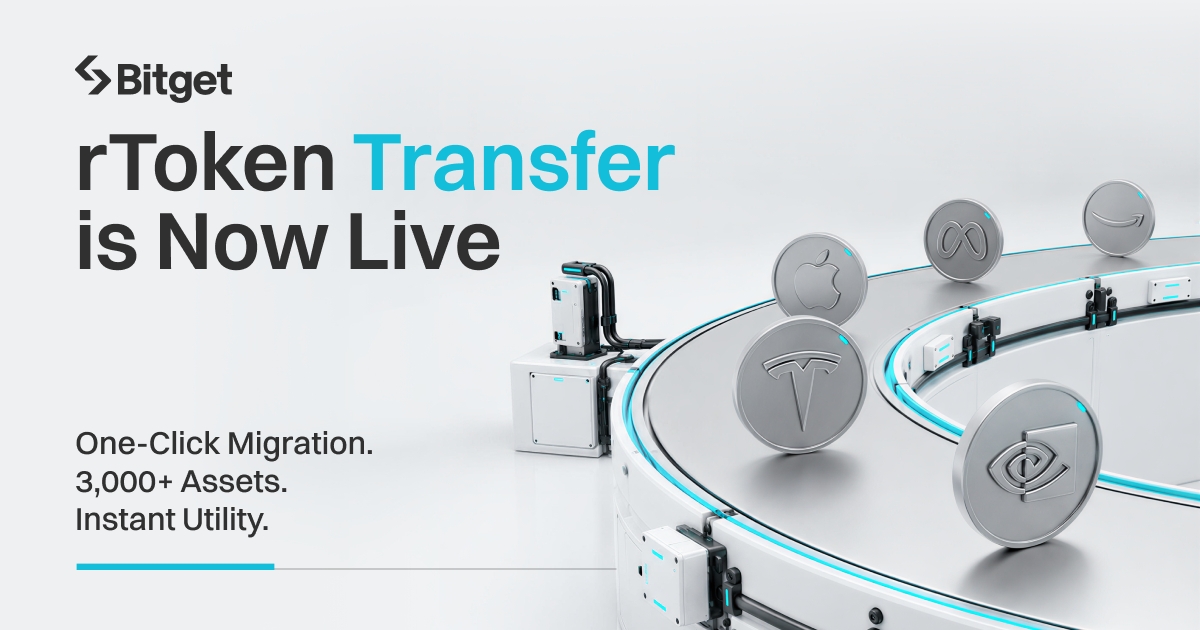
Bitget rToken Stock Transfer is a service that lets eligible users transfer existing U.S.-listed stocks and ETFs from external brokerage accounts to Bitget without selling them first.
The process uses Free of Payment (FOP), a method of moving securities without a simultaneous cash payment. Once the shares arrive at the designated receiving account and are processed, Bitget's In-Kind Tokenization Network (ITN) automatically converts them into corresponding rTokens.
For example, if you transfer 20 eligible Nvidia shares, you'll receive 20 rNVDA tokens when the process is complete. These tokens provide economic exposure to Nvidia's stock but differ from direct share ownership, including in shareholder rights.
After the transfer, supported rTokens can be traded against USDT and used in other eligible Bitget products.
So, what makes rToken Stock Transfer worth considering? Let's look at four benefits.
4 Key Benefits of Bitget rToken Stock Transfer
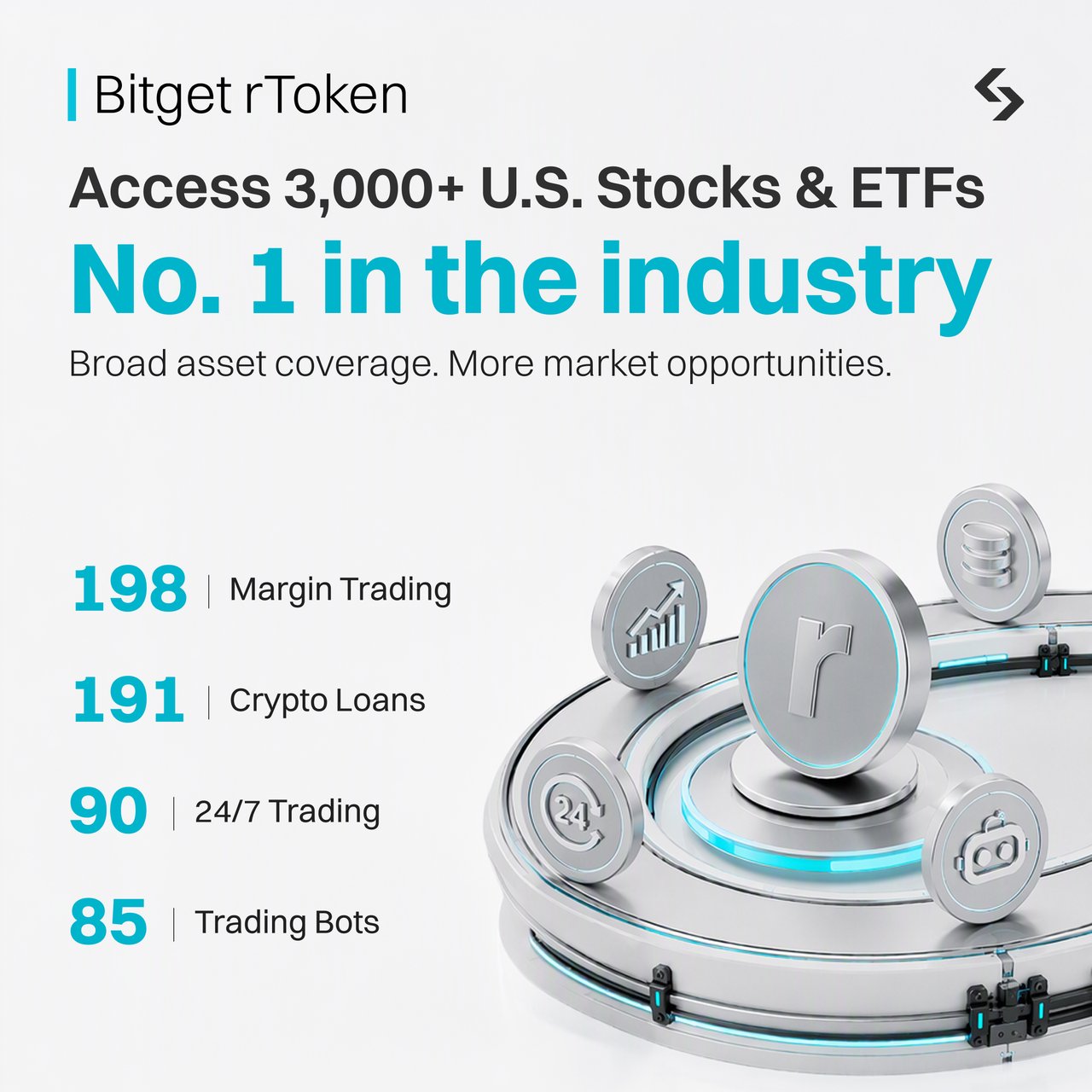
1. Broader Stock Coverage With 3,000+ Eligible U.S. Stocks and ETFs
Not every stock portfolio consists of just Apple, Nvidia, and Tesla. Many investors hold shares across technology, banking, healthcare, consumer goods, and index ETFs. The wider the portfolio, the more important asset coverage becomes.
Bitget rToken Stock Transfer supports more than 3,000 eligible U.S.-listed stocks and ETFs, giving investors a broad range of securities they can potentially move into Bitget.
Consider someone holding 15 Nvidia shares, 20 Apple shares, 30 shares of a banking company, and several ETF positions. Instead of transferring only one popular technology stock, the investor may be able to bring multiple eligible holdings into the same platform.
That offers several advantages:
-
Broader portfolio coverage: Transfer eligible stocks and ETFs from different industries.
-
Greater diversification flexibility: Maintain exposure to a range of companies and funds rather than concentrating on a few assets.
-
Easier portfolio management: Manage supported stock-linked assets alongside cryptocurrencies on Bitget.
For investors who already hold a diversified U.S. stock portfolio, this flexibility matters. The goal isn't necessarily to change which stocks they own. It's to give those existing investments access to a different trading environment.
Of course, not every U.S. security qualifies. Bitget accepts eligible whole shares, while fractional shares, OTC securities, and unsupported instruments are excluded. Users should check the supported list before requesting a transfer.
2. Greater Capital Efficiency: Put Your Stock Holdings to Work
Owning a stock gives you exposure to its price movements and any applicable economic benefits. But what if you want to use that investment for another trading opportunity without selling it?
That's where tokenization can make a difference.
Once eligible shares are converted into rTokens, supported holdings can be used across Bitget's trading and financial products. This may allow investors to access additional liquidity or use their stock-linked assets as collateral.
Take Nvidia as an example.
Imagine an investor who owns 50 eligible Nvidia shares. After transferring and receiving the corresponding rNVDA tokens, the investor may be able to use those tokens as collateral in Bitget's Unified Trading Account (UTA) Advanced Mode, provided the asset and account qualify.
Rather than selling the position to obtain funds for another trade, the investor could use its recognized collateral value to support an eligible trading position while maintaining Nvidia-linked exposure.
Other possible uses include:
-
Margin trading: Use qualifying rTokens as collateral for supported trading activities.
-
Crypto Loans: Borrow eligible cryptocurrencies against supported rToken holdings.
-
Earn opportunities: Access selected yield products available to eligible stock-linked assets.
-
Portfolio management: Manage supported rTokens and cryptocurrencies within Bitget.
The benefit is greater flexibility over how existing capital can be used.
Importantly, this happens after the stock transfer and tokenization are completed, not immediately after submitting the transfer request. Not every rToken qualifies for every financial product.
Margin and lending also involve additional risks. If the collateral value falls, investors may need to add funds or face liquidation. Borrowing costs and product conditions should be considered before participating.
3. A Simpler Stock Transfer With Automatic rToken Conversion
Moving investments between financial platforms can involve several steps. Investors may need to coordinate with their current broker, submit account information, and wait for the receiving institution to process the securities.
Bitget makes the next part easier by connecting the stock transfer with automatic tokenization.
Here's how the process works:
1. Submit your transfer request: Choose your original broker and enter the eligible stocks and quantities you want to transfer.
2. Transfer shares from your broker: Use the receiving-account information provided by Bitget to request an FOP transfer.
3. Receive your rTokens: Once the shares arrive and are processed, ITN automatically mints the corresponding tokens and credits them to your Bitget account.
There's no need to sell your stocks, move the cash, and purchase tokenized equivalents separately. You also don't need to submit another conversion request after the transferred shares are received.
For example, someone transferring 20 Apple shares and 10 Nvidia shares doesn't need to manually convert each position after delivery. Once the eligible shares have been processed, the corresponding rTokens are minted automatically.
This removes an extra step, particularly for investors moving several positions at once.
The original broker still needs to process the securities transfer, so the entire process is not instant. Bitget estimates approximately 10 business days, depending on the broker, settlement status, and transfer details.
Users can also track their transfer status through Bitget instead of having to guess whether the shares have arrived.
4. Zero Transfer-in Fees Charged by Bitget
Transfer costs matter, especially when investors want to move several stocks or a substantial part of their portfolio.
With rToken Stock Transfer, Bitget charges $0 for incoming transfers of eligible securities.
That means Bitget does not add its own transfer-in fee when receiving supported stocks through the service.
However, the original broker or other service providers may charge fees for transferring the shares out.
Here's a quick overview:
| Fee type | Details |
| Bitget stock transfer-in fee | $0 |
| Original broker transfer-out fee | May apply |
| Bitget transfer-out fee | $150 |
| Trading, borrowing, or other product fees | Depend on the service |
For example, suppose an investor wants to transfer several supported stock positions from an external brokerage account. Bitget does not charge an incoming transfer fee for receiving them, although the investor should still check whether the original broker imposes a charge.
The distinction is important: zero transfer-in fees on Bitget do not mean every part of the transfer is free.
Still, removing the receiving-side fee makes it more straightforward to evaluate the cost of moving eligible stock holdings into Bitget.
What Else Can You Do With Your rTokens on Bitget?
The four benefits explain why investors may want to transfer their stocks. But once the shares become rTokens, what can they actually do with them?
Bitget offers several ways to use eligible stock-linked holdings.
1. Trade U.S. Stocks Beyond Traditional Market Hours
Traditional U.S. stock exchanges operate on fixed schedules. Bitget's rToken markets are designed to offer more flexible trading access, including extended sessions.
This can be useful when company announcements or major economic events happen outside regular market hours.
Weekend trading has also been a feature of selected rToken markets. However, Bitget announced a temporary suspension of weekend rToken trading on October 14, 2026, with resumption to be announced separately.
Trading availability, liquidity, and spreads can vary by instrument and market conditions.
2. Use Automated Trading Strategies
Not everyone wants to spend hours watching stock charts.
Bitget has introduced trading bots for selected rToken pairs, allowing users to automate strategies using predefined market signals and parameters.
For example, a trader interested in a supported Nvidia-linked pair could configure an eligible trading bot to monitor conditions and execute orders according to its settings rather than manually placing each trade.
Some rToken bot functions are temporarily unavailable during Bitget's October 2026 system upgrade. The affected Spot Smart Portfolio and Spot Trend Tracker bot pairs were delisted pending reopening, while rToken Spot Auto-Invest remains unaffected.
Bot trading is not a guaranteed source of profit. Automated strategies can lose money, particularly during volatile or low-liquidity periods.
3. Access Crypto Loans and Earn Products
Eligible rTokens may also be used to access Crypto Loans and selected Earn products.
This gives investors options beyond spot trading. They may be able to borrow supported cryptocurrencies against qualifying rToken holdings or participate in available yield products.
For users who hold both crypto and stock-linked assets, these services offer another way to manage capital within Bitget.
Availability and risk vary by product, so investors should review the supported assets and terms before participating.
How to Transfer Your U.S. Stocks to Bitget
Interested in moving your existing shares? The process starts with a transfer request on Bitget and ends with automatic rToken conversion.
Step 1: Submit Your Stock Transfer Request
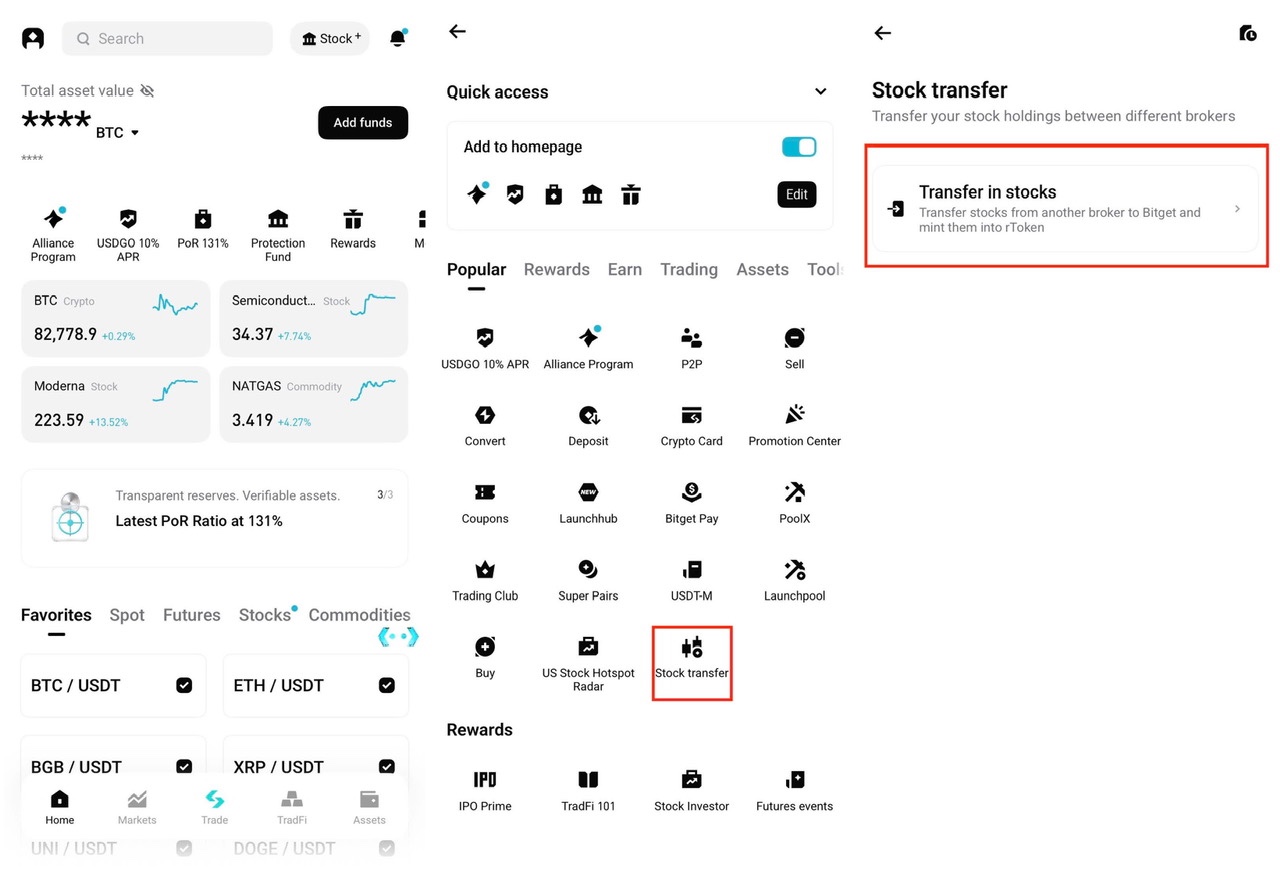
Open the Bitget app, go to More → Stock transfer, and select Transfer in stocks.
Choose your broker, provide the required account information, and select the eligible stocks you want to transfer.
Step 2: Request a Transfer From Your Broker
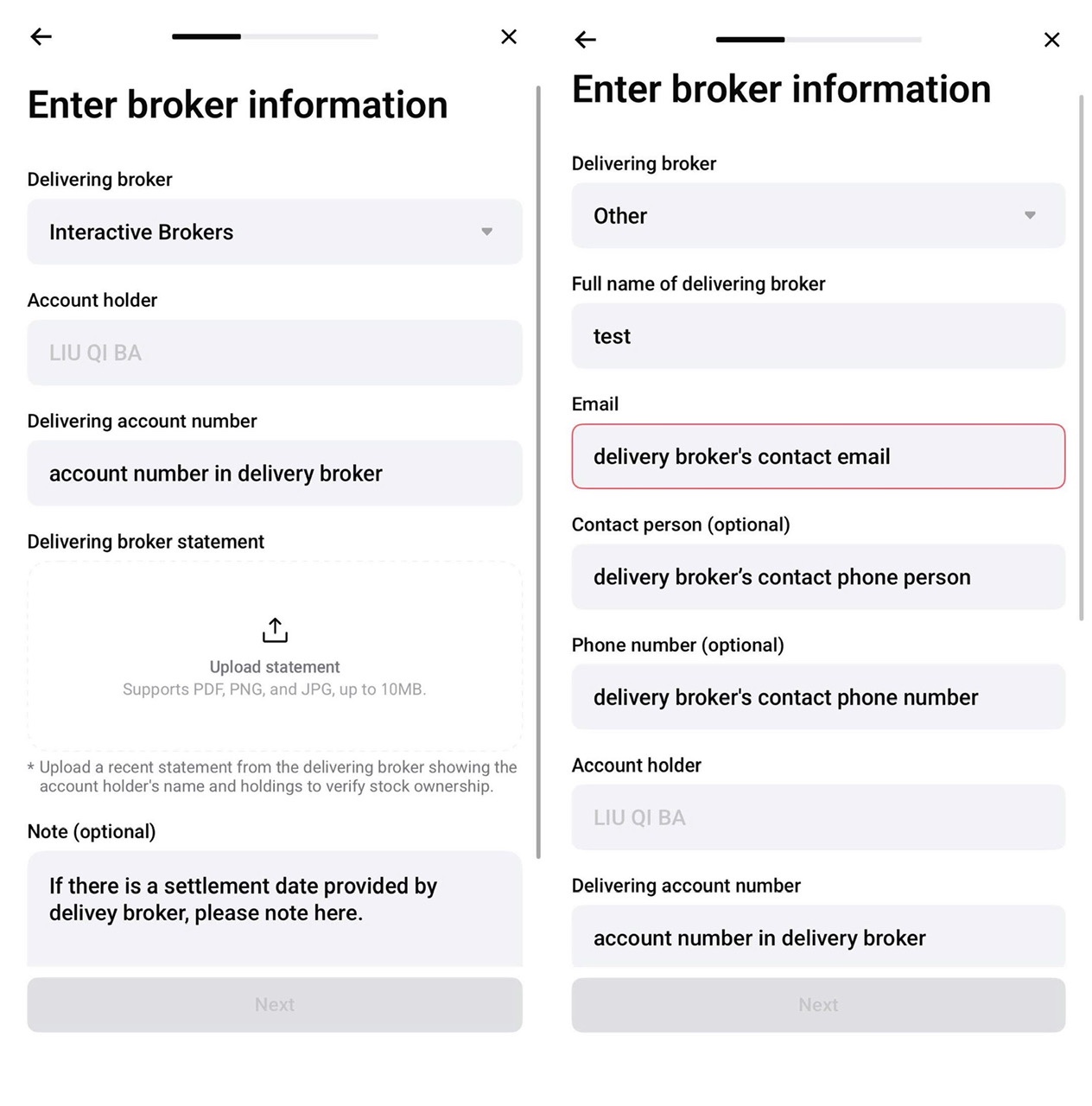
Use the receiving-account information provided by Bitget to submit an FOP stock transfer through your existing brokerage account.
Follow your broker's instructions and check that your account details are correct.
Step 3: Receive Your rTokens Automatically
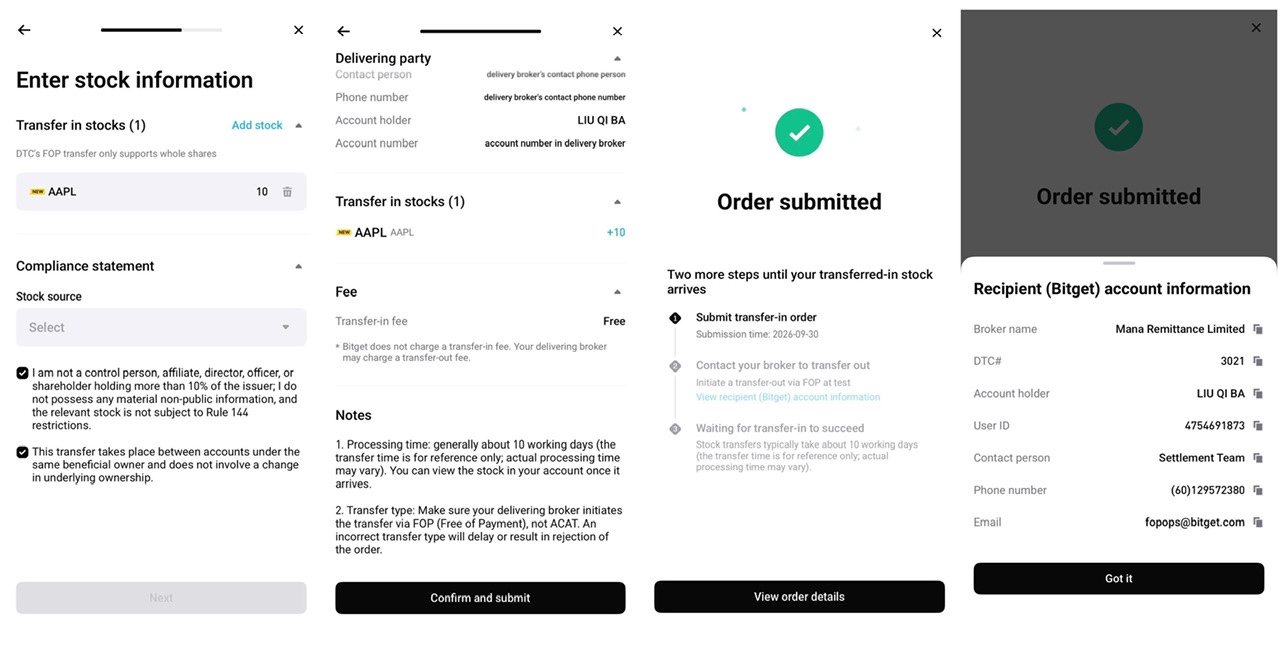
After the shares arrive and are processed, Bitget automatically converts them into the corresponding rTokens.
You can check your transfer progress and credited holdings through your Bitget account.
Transfers typically take around 10 business days, although the actual time may vary.
Learn more: How to Transfer Your Stocks to Bitget.
An Extra Benefit: Bitget's $1M Stock Transfer Rewards Campaign
There's another reason eligible investors may want to explore rToken Stock Transfer now.
Bitget is running a $1 million Stock Transfer Rewards campaign from October 13 to November 18, 2026, offering rSPCX rewards to qualifying users who complete their first eligible stock transfer.
Depending on the qualifying first transfer amount, users may receive the following rewards:
| First qualifying transfer | rSPCX reward | Additional reward |
| $5,000 or more | $200 worth | — |
| $20,000 or more | $800 worth | $50 Spot fee rebate voucher |
| $50,000 or more | $2,000 worth | $150 Spot fee rebate voucher |
For example, an investor whose first successful transfer qualifies for the $20,000 tier may receive $800 worth of rSPCX and a $50 Spot trading-fee rebate voucher, subject to the campaign rules.
No separate campaign registration is required. However, only the first qualifying transfer counts toward rewards.
The rSPCX rewards are distributed in three installments, with each payment subject to an 80% rToken holding-value requirement. Eligibility, regional restrictions, reward availability, and other campaign conditions apply.
The campaign runs until November 18, 2026, at 10:59 (UTC+8). Since stock transfers take time, investors should factor in the processing period.
For complete details, visit Bitget's $1M Stock Transfer Rewards Campaign.
Final Thoughts
Why should your U.S. stocks be limited to traditional trading when they could do more? With Bitget rToken Stock Transfer, investors can bring more than 3,000 eligible U.S. stocks and ETFs into Bitget without selling them first. Automatic tokenization, zero Bitget transfer-in fees, and broader portfolio coverage make it easier to connect existing investments with new trading opportunities.
But the real value begins after the transfer. From trading and automated strategies to eligible Crypto Loans, margin trading, and Earn products, Bitget gives investors more ways to put their stock-linked holdings to work. The ongoing $1 million Stock Transfer Rewards campaign adds another reason to explore the service, with rewards available to qualifying users. Your stocks have already earned a place in your portfolio. Now they could play a bigger role in what comes next.
Frequently Asked Questions About Bitget rToken Stock Transfer Benefits
1. What Are the Main Benefits of Bitget rToken Stock Transfer?
The four main benefits are access to more than 3,000 eligible U.S. stocks and ETFs, additional uses for supported rTokens through trading and financial products, automatic tokenization after transfers are processed, and zero incoming stock-transfer fees charged by Bitget.
2. Can I Transfer My Entire U.S. Stock Portfolio to Bitget?
You may be able to transfer multiple positions if your stocks and ETFs appear on Bitget's supported list. The service covers more than 3,000 eligible U.S. securities, but not every holding qualifies. Only supported whole shares can be transferred, and fractional shares and OTC securities are excluded.
3. Can I Use Transferred rTokens for Bot Trading?
Selected rToken pairs support automated trading products on Bitget. However, some bot functions are temporarily unavailable during the October 2026 system upgrade. Users should check current pair availability before creating an automated strategy.
4. Can I Use My rTokens as Collateral or for Crypto Loans?
Yes, eligible rTokens may be used as collateral in UTA Advanced Mode or pledged through supported Crypto Loans. Collateral limits, borrowing conditions, interest, and liquidation risks depend on the asset and product.
5. Does Bitget Charge Fees for Transferring U.S. Stocks?
Bitget charges $0 for incoming stock transfers. Your original broker or a third-party provider may still charge an outgoing transfer fee. Other trading and financial product fees can apply after your rTokens are credited.
Ready to make more of your U.S. stocks? Start your Bitget rToken Stock Transfer today and explore what your eligible holdings could unlock, including additional transfer rewards.
Disclaimer: This article is for informational purposes only and does not constitute financial or investment advice. rTokens and related trading, lending, and Earn products involve risks. Product availability, eligibility, fees, and rewards are subject to applicable terms and may change.