
How to Request a Refund of Uncredited Deposit
How to Request a Refund of Uncredited Deposit
[Estimated Reading Time: 3 minutes]
This guide provides a step-by-step walkthrough for retrieving deposits made with unlisted coins or via unsupported networks on Bitget. Utilizing the Self-Service Refund feature ensures a secure and efficient recovery process.
How to request a refund of uncredited deposit
Step 1: Access the Self-Service Refund page
1. Log in to your Bitget account on the Bitget website.
2. Click on your profile icon in the upper-right corner and choose Deposit.
3. Click [Refund of uncredited deposit] located at the right side of the page.
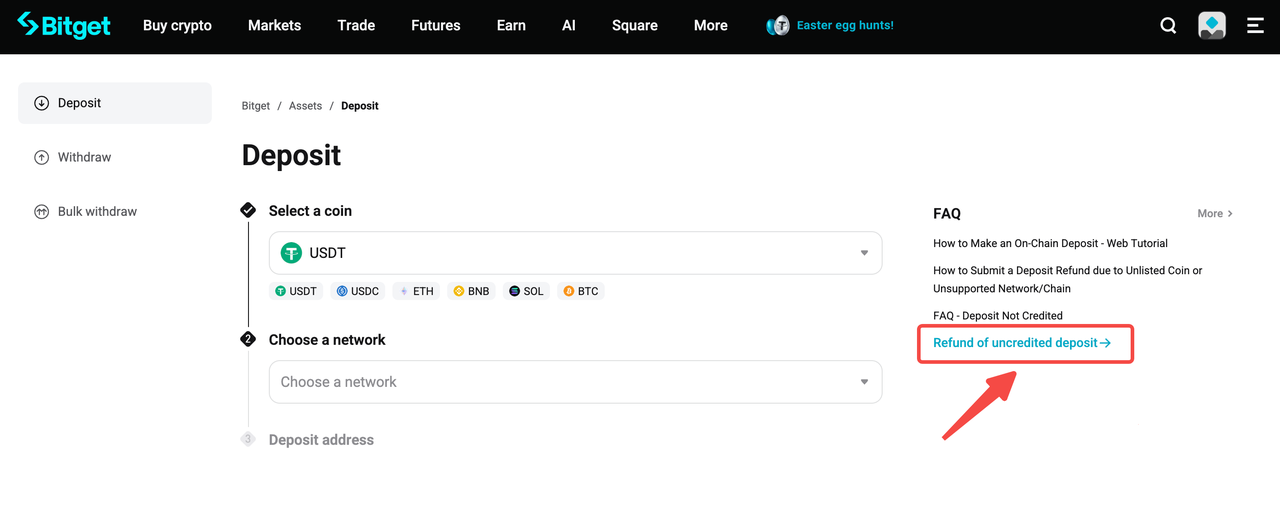
Step 2: Select the Issue Type
1. Choose the issue type and click Apply to proceed, unless you have another specific reason or are unsure about the exact issue, choose [other/don't know].
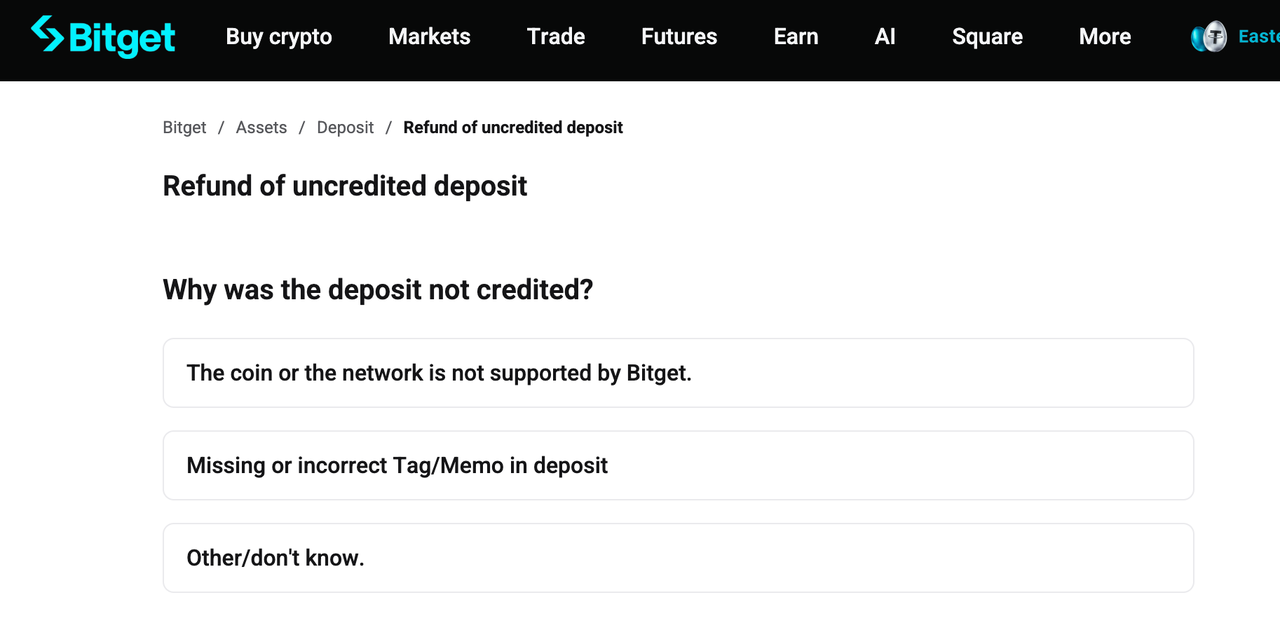
Step 3: Complete the Refund Form
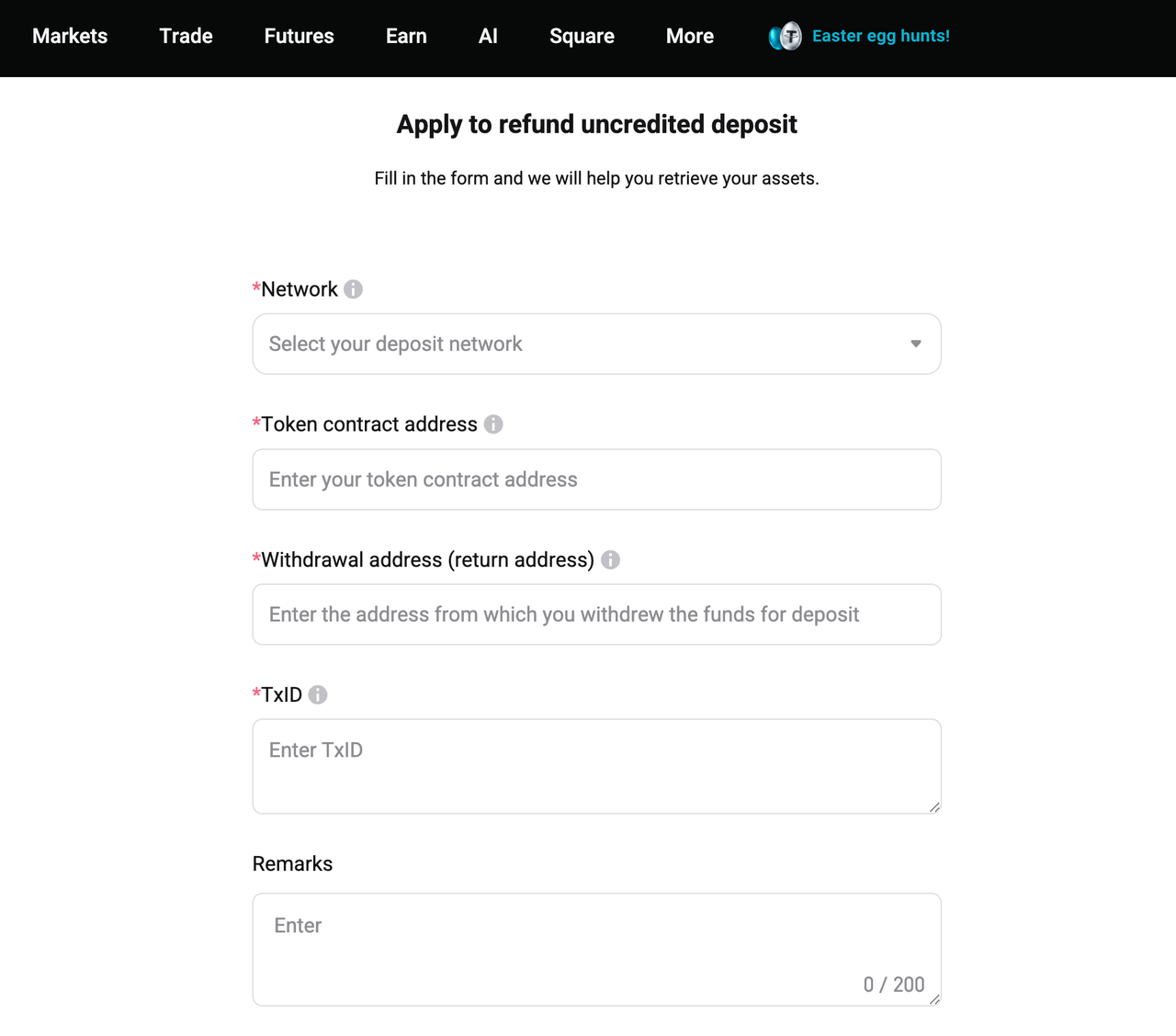
Issue 1 - The coin or the network is not supported by Bitget.
If the coin you were trying to deposit is not listed on Bitget or has been delisted, or the network you selected is not supported by Bitget, the deposit will not be credited.
1. Network - When depositing into Bitget, please make sure to fill in the transaction information based on the deposit network you selected. If you cannot confirm the network on which the deposit was executed, please reach out to the withdrawal platform.
2. Token contract address - You can find it by entering your TxID (transaction hash) into a block explorer (such as Etherscan), and then clicking the token name to view its contract address. Note: The contract address is not the same as the deposit address. Please double-check before submitting. Click here for a step-by-step guide on how to find a token's contract address.
3. Withdrawal address - The address that you made the withdrawal. Make sure the address is correct, as we will return the assets to the on-chain address.
4. TxID - The transaction ID (TxID) is a unique identifier for each blockchain transaction. You can find the TxID in your withdrawal history. If you cannot find the TxID, contact the withdrawal platform for assistance. Make sure that the TxID matches the block transaction information. Do not fill in information other than the TxID/TxHash (such as the deposit/withdrawal addresses, account details, email, etc.)
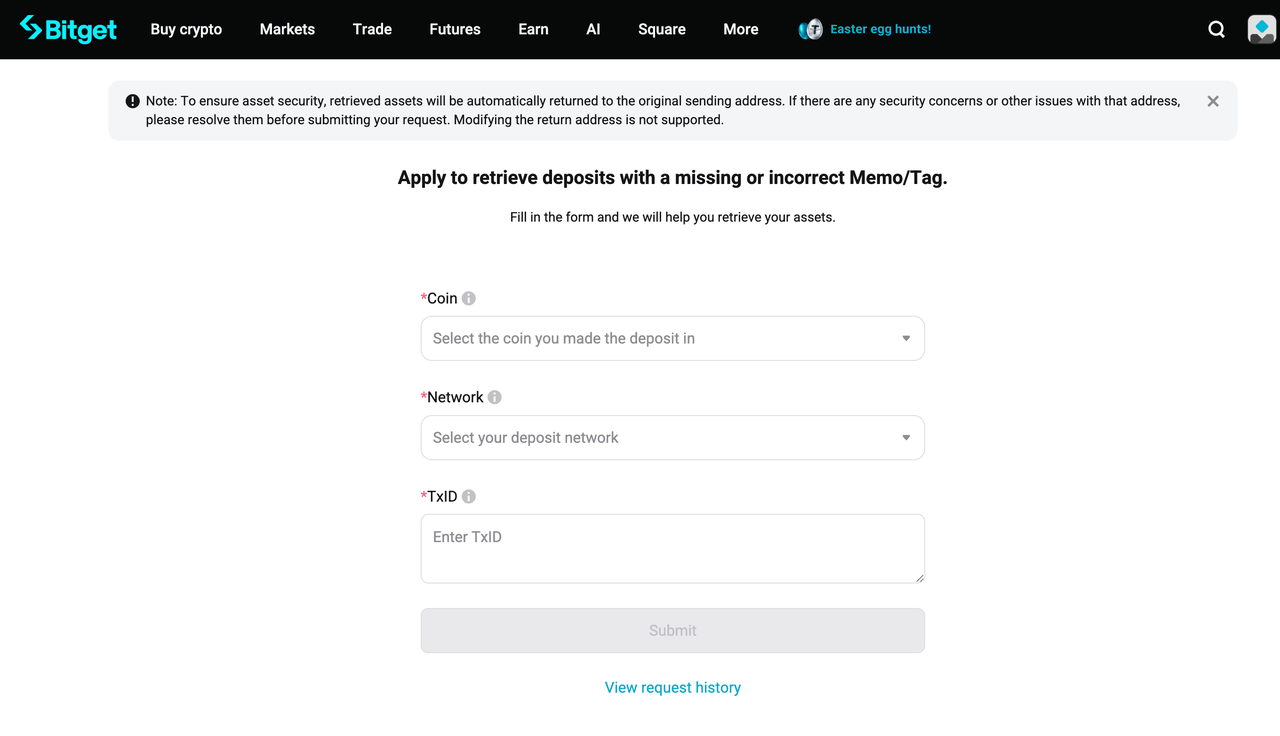
Issue 2 - Missing or incorrect Tag/Memo in deposit
Certain networks (such as EOS) require a Memo for deposits. If the address or memo is incorrect or missing, your deposit may fail to arrive.
1. Coin - Select the token you deposited to Bitget and enter all details that align with your transaction records. If you're unsure, confirm with the platform you used for the withdrawal.
2. Network - When depositing into Bitget, please make sure to fill in the transaction information based on the deposit network you selected. If you cannot confirm the network on which the deposit was executed, please reach out to the withdrawal platform.
3. TxID - The transaction ID (TxID) is a unique identifier for each blockchain transaction. You can find the TxID in your withdrawal history. If you cannot find the TxID, contact the withdrawal platform for assistance. Make sure that the TxID matches the block transaction information. Do not fill in information other than the TxID/TxHash (such as the deposit/withdrawal addresses, account details, email, etc.)
Issue 3 - Other/don't know
1. In progress/failed
If the deposit order is still in progress or has failed, please wait for further updates or contact the payment platform for support. Bitget has not received the funds and cannot assist you further.
2. Completed (funds have been transferred out)
If the deposit has been completed on the payment platform, the reasons for crediting failure could be:
• The memo/tag was incorrect or empty.
• The withdrawal from Bitget to another exchange failed, resulting in the funds being returned to Bitget.
• Other unknown reasons.
Please submit a ticket and provide the relevant transaction proof so we can assist you in retrieving your assets.
Important to Know
• Eligibility: Not all deposits are eligible for refunds. Bitget strives to assist users but cannot guarantee recovery in all cases.
• Processing Time: Applications may take up to 10 working days to process, depending on the case's complexity and provided information's accuracy.
• Accuracy: Providing precise information accelerates the refund process.
FAQs
1. What happens if I deposit using the wrong network?
If you deposit funds using the wrong or unsupported network, the deposit may not be credited to your Bitget account. You can submit a Self-Service Refund request for review. Recovery depends on the network used, asset type, and whether the funds can be retrieved.
2. How can I find the token contract address for my application?
You can search your TxID on a blockchain explorer, then open the token details to locate the contract address. Make sure you do not confuse it with your deposit address.
3. What happens if I entered the wrong Memo or Tag?
Some blockchain networks require a Memo or Tag. If it is missing or entered incorrectly, the deposit may not arrive automatically and may need manual review.
4. How long does a refund application usually take?
Processing may take up to 10 working days, depending on case complexity and whether the submitted information is complete and accurate.
Join Bitget, the World's Leading Crypto Exchange and Web3 Company
*This announcement is time-sensitive. Please note the date of publication. The platform assumes no responsibility for any direct or indirect losses arising from changing circumstances or outdated content.