
How to Apply to Be a Bitget P2P Merchant? - Mobile App Guide
How to Apply to Be a Bitget P2P Merchant? - Mobile App Guide
[Estimated Reading Time: 5 minutes]
Ang artikulong ito ay nagbibigay ng sunud-sunod na gabay para sa mga gumagamit ng Bitget na gustong maging isang P2P merchant gamit ang Bitget mobile app. Sundin ang gabay na ito upang isumite ang iyong aplikasyon at simulan ang pangangalakal bilang isang beripikadong P2P merchant.
How to Apply to Be a Bitget P2P Merchant on Mobile App?
Step 1: Open the P2P page
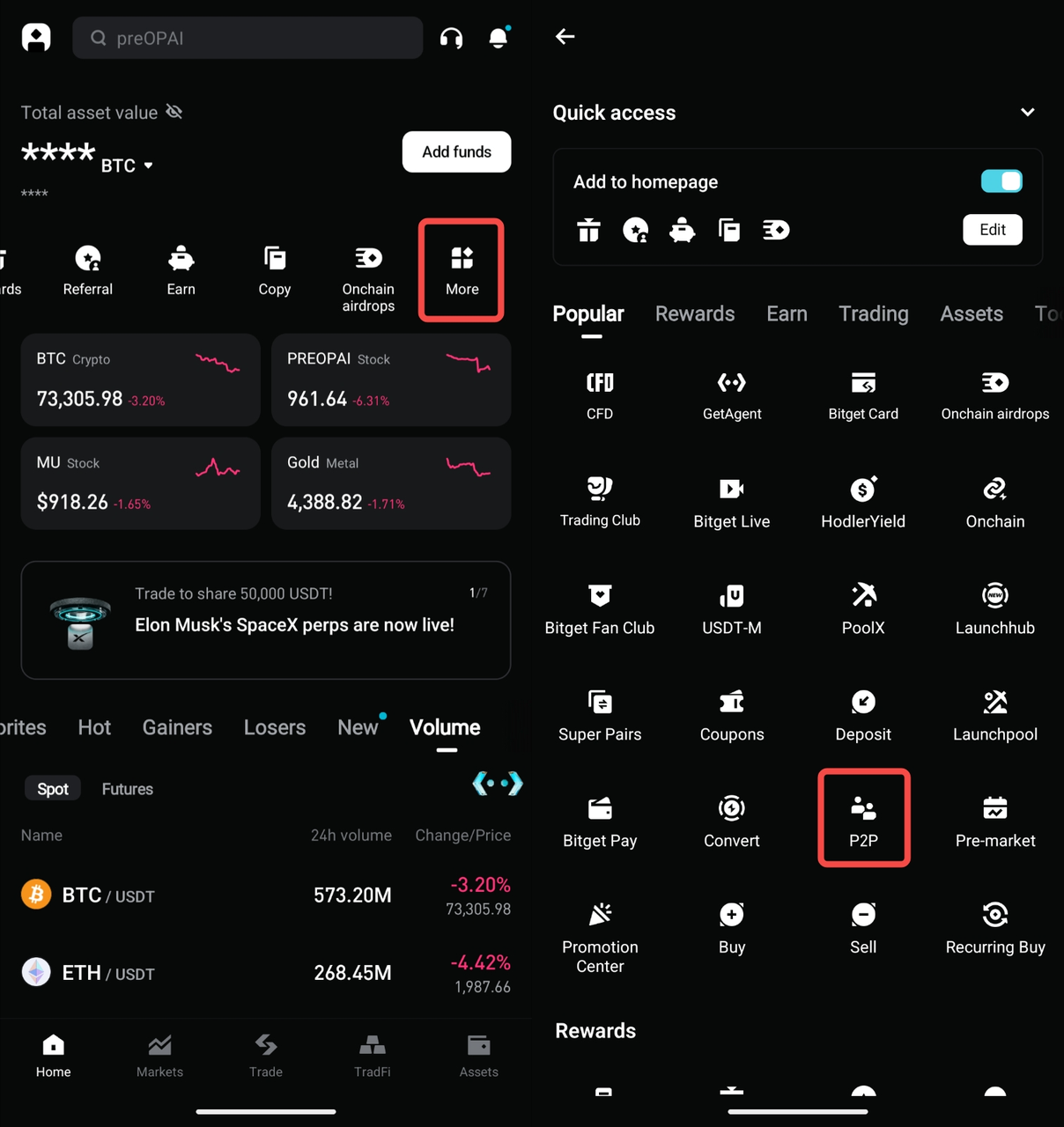
1. Open the Bitget app and go to the Home page.
2. Tap More.
3. Under the Popular section, tap P2P to enter the P2P trading page.
Step 2: Open the merchant application page
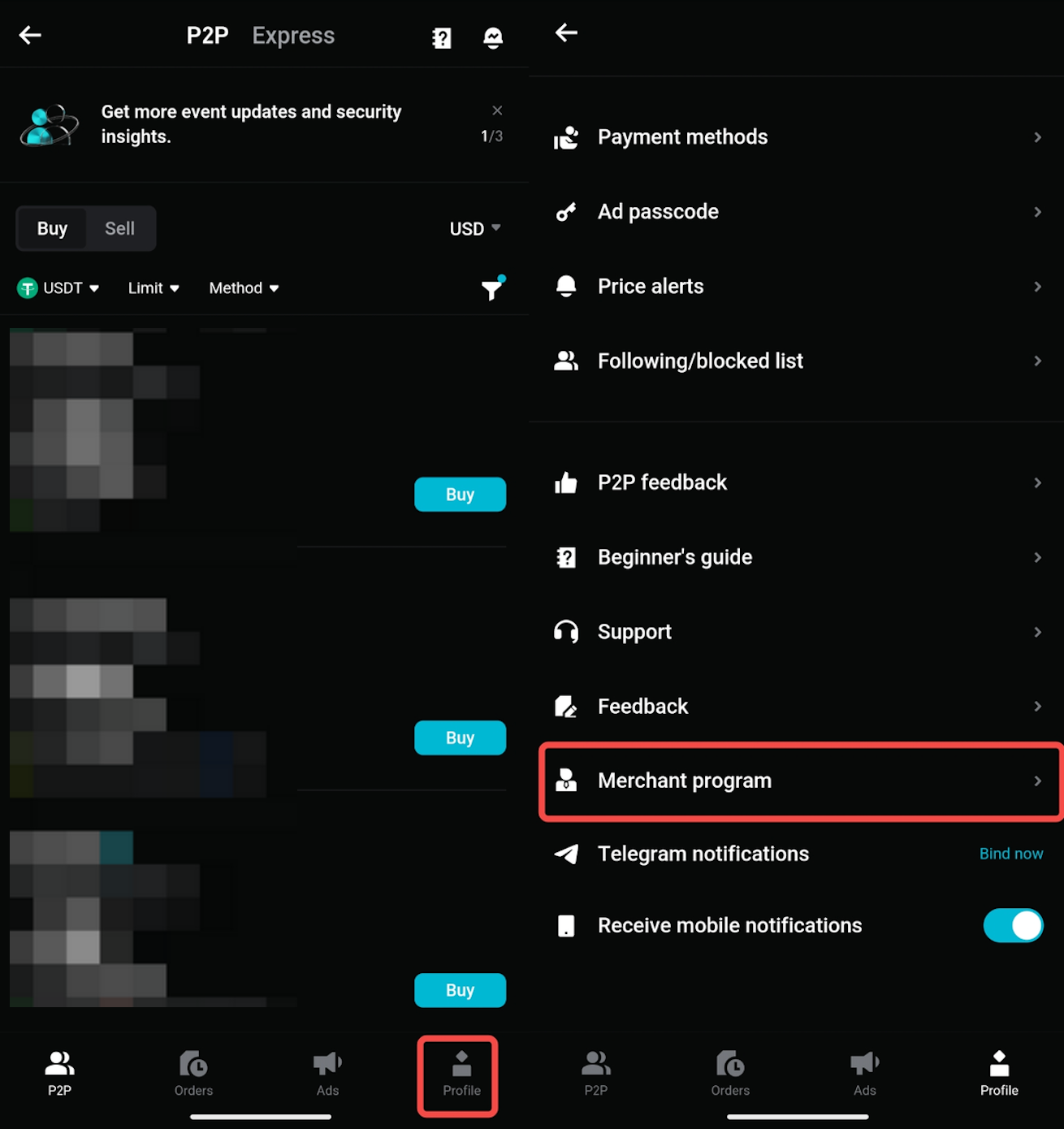
1. On the P2P page, tap Profile in the bottom navigation bar.
2. Select Merchant program.
3. Follow the on-screen instructions to start your merchant application.
Step 3: Complete the application requirements
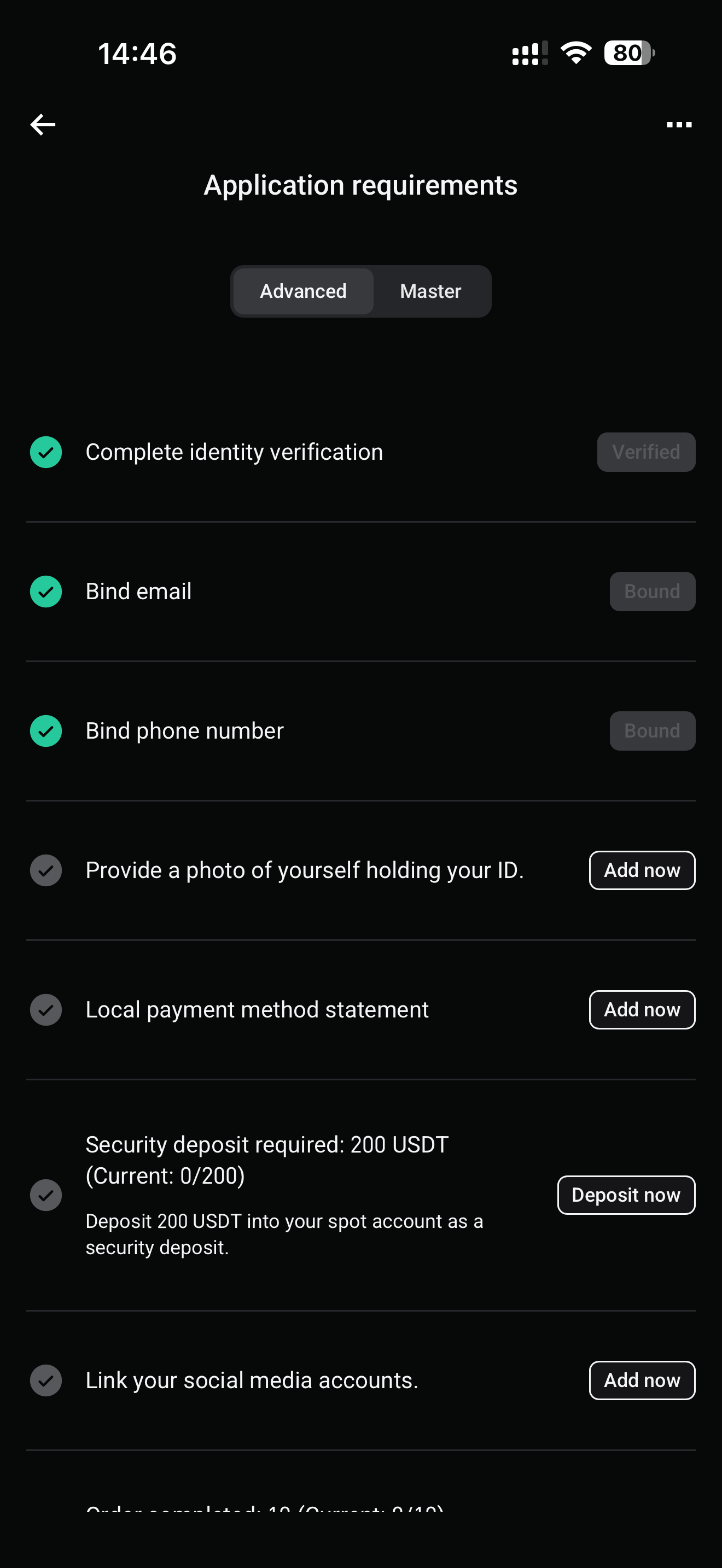
1. On the Application requirements page, choose the merchant level you want to apply for:
• Advanced
• Master
2. Kumpletuhin ang lahat ng mga kinakailangan na nakasaad sa pahina.
Step 4: Meet the Application Requirements
Siguraduhing natutugunan mo ang mga sumusunod na kinakailangan bago isumite ang iyong aplikasyon:
1. Submit identity proof:
• Upload a photo of yourself holding your ID card, with the front side clearly visible.
• Siguraduhing malinaw na nakikita ang iyong mukha, ID card, at mga dokumento.
• Accepted formats: JPEG and PNG. Ang bawat file ay dapat na mas maliit sa 10 MB.
2. Complete verification:
Ensure your Bitget account is fully verified, including:
• Completing identity verification.
• Binding your email address.
• Binding your phone number.
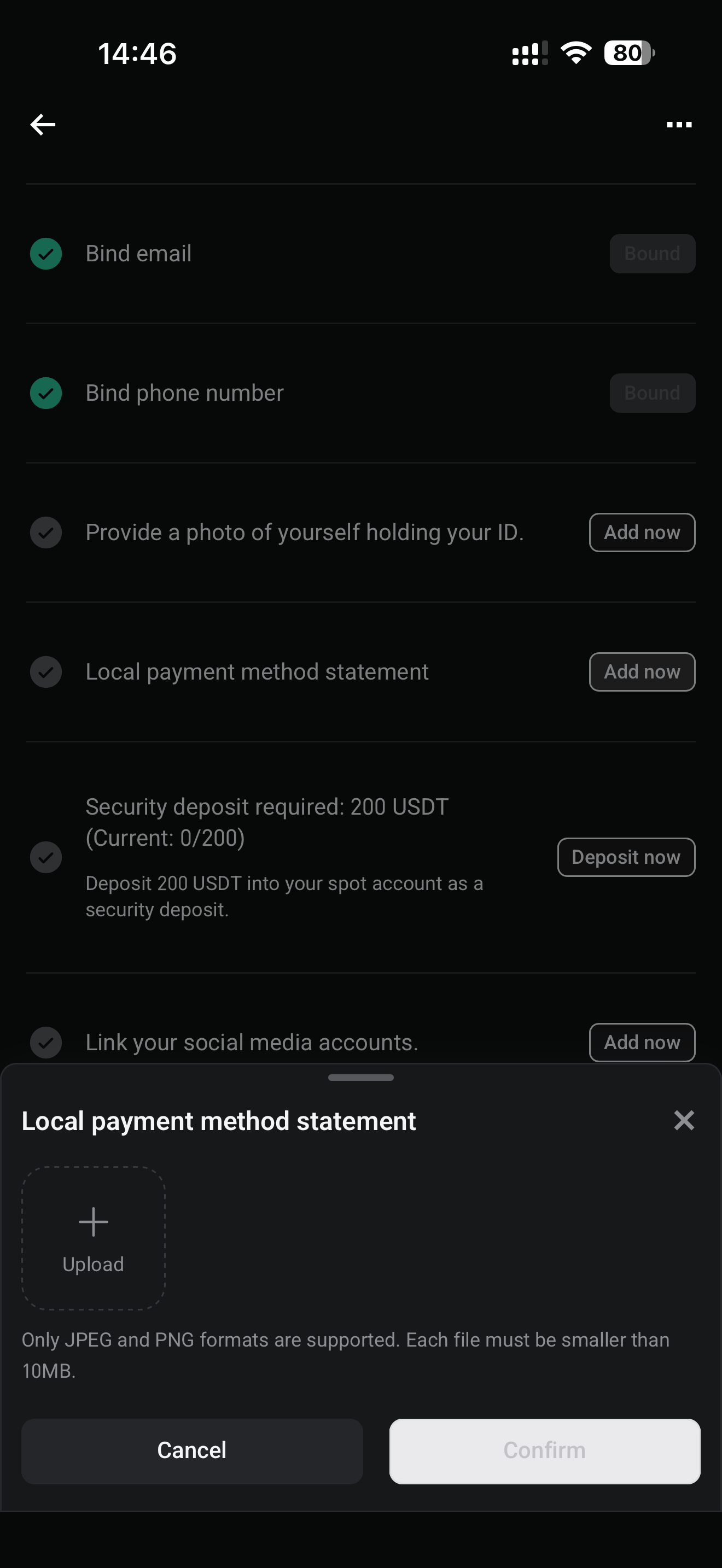
3. Provide a local payment method statement:
• Upload your local payment method statement or proof of P2P transaction history from other trading platforms.
• Ensure your details match across all uploaded documents.
4. Provide a security deposit:
• Magdeposito ng 200 USDT sa iyong spot account bilang security deposit.
• Tiyaking mayroon kang sapat na USDT sa iyong spot account bago isumite ang aplikasyon.
• Awtomatikong ihihinto ang security deposit sa oras na maisumite ito.
• Kung ititigil mo ang pagiging isang merchant, ibabalik ang security deposit pagkatapos matagumpay na mapawalang-bisa ang iyong merchant status, basta't natugunan ang lahat ng kinakailangan sa pagpapawalang-bisa. Kung makakaranas ka ng anumang problema, mangyaring mag-email sa p2p@bitget.com.
5. I-link ang iyong mga social media account:
• Magbigay ng mga detalye sa pakikipag-ugnayan para sa kahit isang social media account, tulad ng Telegram, WhatsApp, o X.
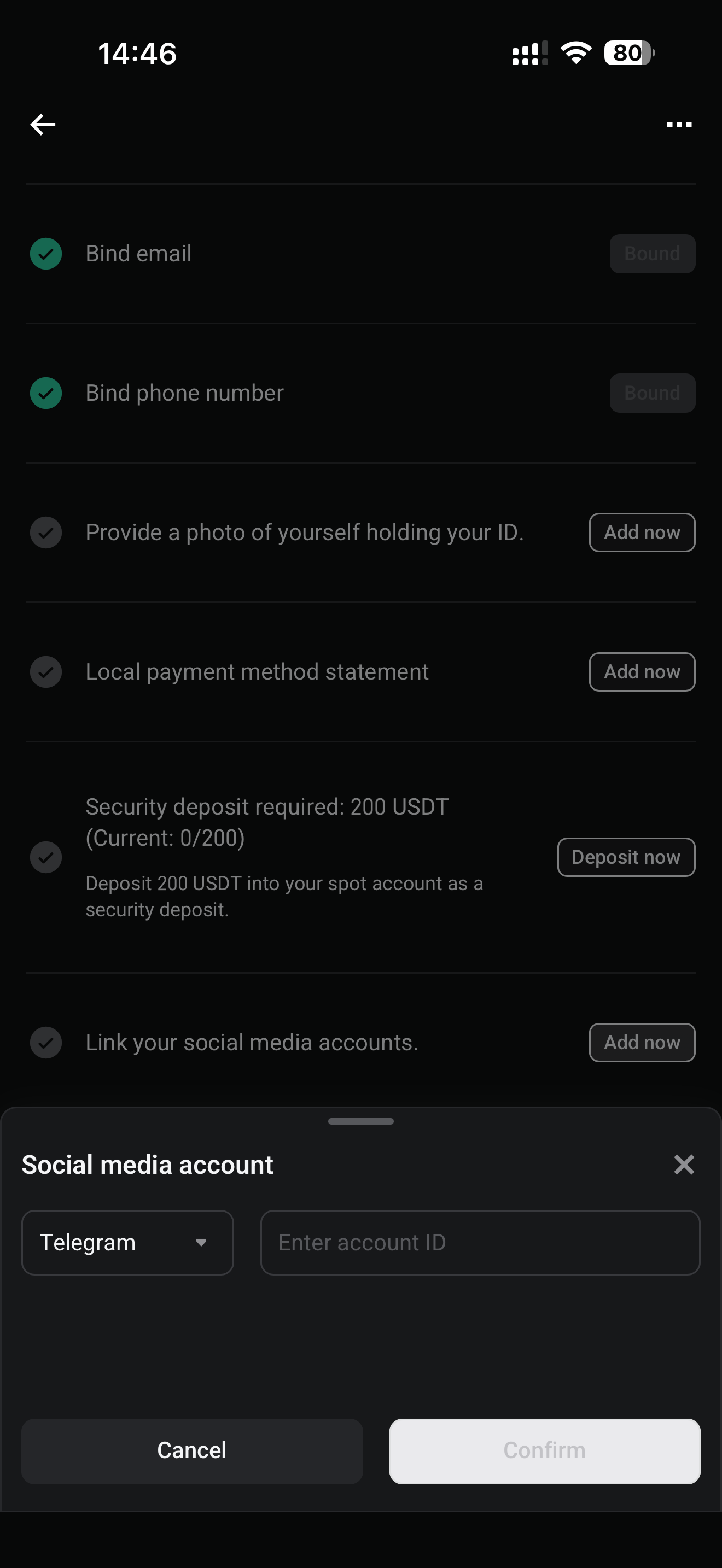
6. Meet the trading requirements:
• Complete at least 10 orders.
• Maintain a completion rate of at least 90%.
• Makipagkalakalan sa kahit limang natatanging gumagamit sa nakalipas na 30 araw.
7. Read and agree to the Merchant Service Agreement and tap Submit application.
Step 5: Wait for Application Review
1. Pagkatapos maisumite, ang iyong aplikasyon ay susuriin ng Bitget P2P team sa loob ng 5 araw ng negosyo.
2. Para mapabilis ang proseso, mangyaring mag-email p2p@bitget.com kasama ang iyong Bitget user ID.
Step 6: Approval and Activation
1. Kapag naaprubahan na, makakatanggap ka ng email ng kumpirmasyon, kasama ang link sa Telegram para sumali sa isang nakalaang customer support group para sa mga merchant.
2. Kung hindi ka pa sumasali sa grupo pagkatapos ng pag-apruba, kontakin ang Bitget sa Telegram para humingi ng link.
3. Start posting ads and trading as a verified merchant with zero fees.
FAQs
1. Anong mga dokumento ang kinakailangan upang mag-aplay bilang isang merchant?
• A photo of yourself holding your ID card (front view).
• A bank statement for each selected fiat currency.
2. Magkano ang safety deposit na kailangan para maging merchant?
Ang halaga ng deposito ay depende sa mga fiat na pera na iyong pinili sa panahon ng proseso ng aplikasyon. Awtomatikong kalkulahin ng system ang kabuuang deposito.
3. Maaari ko bang bawiin ang aking safety deposit?
Oo. Ibabalik ang safety deposit pagkatapos matagumpay na mapawalang-bisa ang iyong merchant status, basta't natugunan ang lahat ng kinakailangan sa pagpapawalang-bisa.
4. Gaano katagal bago maproseso ang aking merchant application?
Karaniwang sinusuri ang mga aplikasyon sa loob ng 5 araw ng negosyo.
5. Ano ang mangyayari pagkatapos maaprubahan ang aking aplikasyon?
You will receive:
• A confirmation email with a Telegram link to join a dedicated merchant support group.
• Access to exclusive merchant tools and 24/7 customer service via the Telegram group.
6. Maaari bang tanggihan ang aking aplikasyon?
Oo, maaaring tanggihan ang mga aplikasyon kung:
• Identity verification (KYC) is incomplete.
• Required documents are missing or invalid.
• The safety deposit amount is insufficient.
*Ang anunsyong ito ay sensitibo sa oras. Pansinin ang petsa ng paglalathala. Hindi mananagot ang platform para sa anumang direkta o di-tuwirang pagkalugi na nagmumula sa pagbabago ng mga kalagayan o lipas na nilalaman.