
Buy Bouncing DVD Video - How to safely buy Bouncing DVD Video (DVD) for beginners in 5 minutes
Updated on: 2026/10/24 14:55:14 (UTC+0)
Sign up now to claim a welcome pack worth 6200 USDT!
Bouncing DVD Video (DVD) price: $0.{4}1400
Note: Good things take time. This coin hasn't been listed yet. Stay tuned to our announcements for listing updates. Once it's available on Bitget, you can follow our tutorial to purchase it. The same tutorial applies to all listed cryptocurrencies on Bitget.
Buy DVD in 3 easy steps!
Create your free Bitget account
Provide your email address and place of residence.
Select a funding method
Fund your account using your preferred payment method.
Complete your Bouncing DVD Video purchase
Buy Bouncing DVD Video with as little as $1.
Step 1: Create a free account on the Bitget website or the app
Sign up or download the Bitget app to start your journey on Bitget.
Sign up for a Bitget account using your email address or mobile number.
Please verify your identity to ensure full compliance and enhance your Bitget experience.
You can access the identity verification page, select your country, upload your ID documents, and submit your selfie. You will receive a notification once your identity has been successfully verified.
Complete identity verification (KYC) to unlock all trading features, including crypto, spot stocks (rTokens), metals, forex, and commodities.
Step 2: Place an order for Bouncing DVD Video using a payment method of your choice:
Buy Bouncing DVD Video with a debit/credit card
For Visa or Mastercard, select Credit/Debit card, then click Add New Card under the "Buy" tab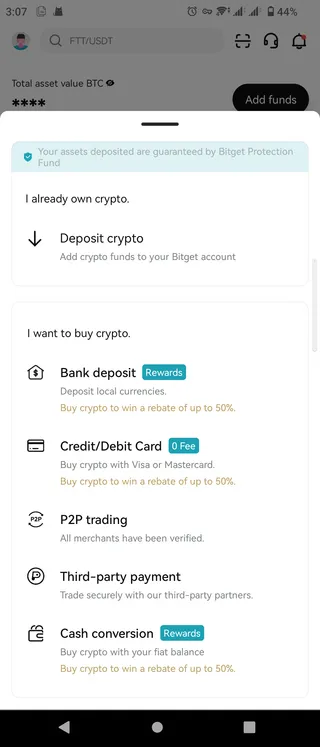 Credit/Debit in the Buy Crypto tab of the Bitget app
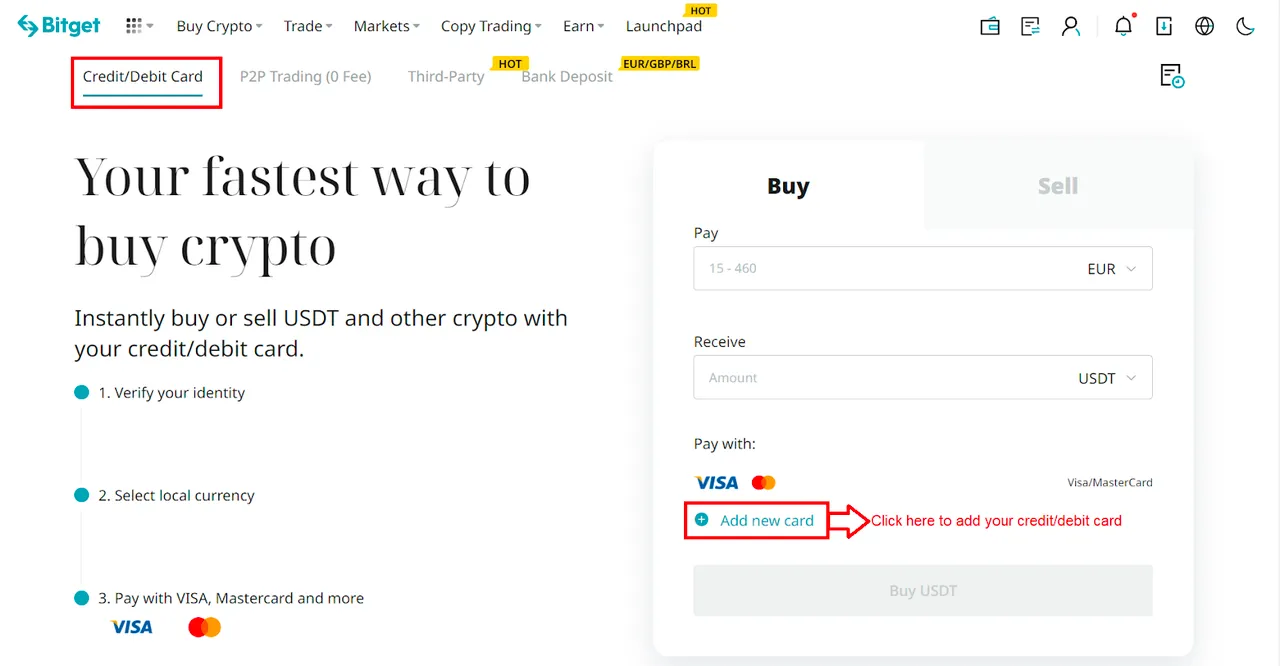 Credit/Debit in the Buy Crypto tab of the Bitget websiteSelect your preferred fiat currency, enter the amount you wish to spend, link your credit card, and then complete your payment with zero fees.
 Add a new card to complete your payment on the Bitget app
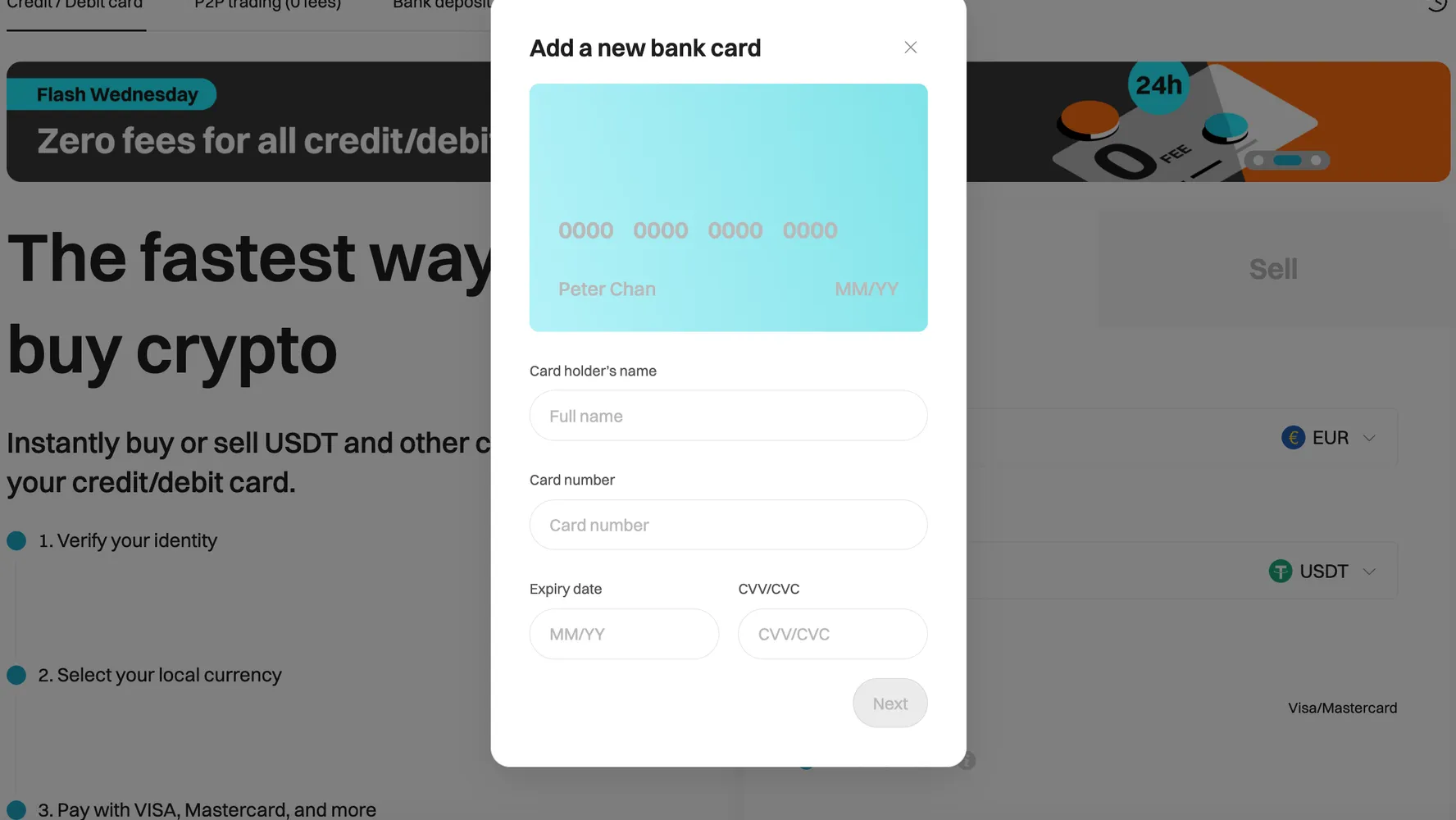 Enter your bank card details to complete your payment on the Bitget websiteFor Diners Club/Discover card, click Buy Crypto > [Third Party] in the top navigation bar to place your Bouncing DVD Video order.
 How to buy crypto with credit/debit card
Buy Bouncing DVD Video with Google Pay or Apple Pay
Converting your Google Pay and Apple Pay balance into Bouncing DVD Video is easy and secure on Bitget. Simply click Buy Crypto > [Third Party] in the top navigation bar to place your Bouncing DVD Video order.How to buy crypto via third-party gatewayBuy Bouncing DVD Video with bank transfer
We accept various payment methods, including iDeal and SEPA for EUR, PIX for BRL, PayID for AUD, UPI for INR, QRIS, DANA, and OVO for IDR, SPEI for MXN, and GCash for PHP. These services are facilitated by Alchemy Pay, Banxa and Simplex payment gateways. Simply select Buy Crypto > [Third Party] in the top navigation bar and select a fiat currency to place your Bouncing DVD Video order.Buy Bouncing DVD Video with the fiat balance in your Bitget account
You can Deposit fiat funds using Advcash, SEPA, Faster Payments, or PIX payment gateways to top up your Bitget fiat balance. Then, click Buy Crypto > [Cash conversion] in the top navigation bar to place your Bouncing DVD Video order.P2P trading
With Bitget P2P, you can buy crypto using over 100 payment methods, including bank transfers, cash, and e-wallets like Payeer, Zelle, Perfect Money, Advcash, and Wise. Simply place an order, pay the seller, and receive your crypto. Enjoy secure transactions with escrow protection.How to buy crypto on Bitget P2P
Step 3: Monitor Bouncing DVD Video in your Bitget spot wallet
If you've chosen to purchase Bouncing DVD Video on Bitget, your Bouncing DVD Video will be instantly credited to your Bitget spot account upon payment completion. You can click Assets located on the top right corner of the page to check your assets. Additionally, you can buy, deposit, convert, trade, and withdraw them.
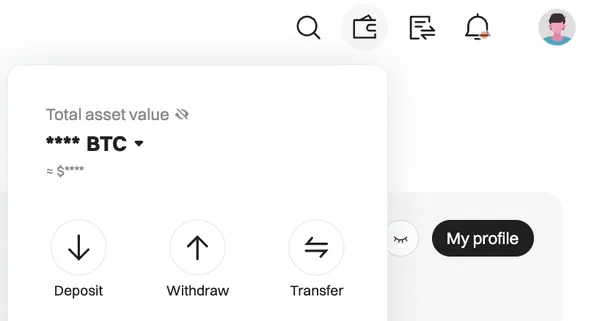
Check your assets
Bitget boasts a high-efficiency trading engine, delivering a fast and smooth trading experience for over 100 million platform users across more than 150 countries and regions worldwide—making it an ideal choice for users seeking reliability and speed.
The above cryptocurrency buying guide has been reviewed by the Bitget research team and the Bitget legal team.
Note: Want to keep tabs on coin prices? Visit our
Coin prices directory
or
Bouncing DVD Video Price Page
and bookmark them to stay updated!
Bitget—where the world trades Bouncing DVD Video
Ultimate user experience: fast and convenient
A smooth and seamless trading experience
Bitget boasts a high-efficiency trading engine, delivering a fast and smooth trading experience for over 100 million platform users across more than 150 countries and regions worldwide—making it an ideal choice for users seeking reliability and speed.
Leading launch platform for high-quality early-stage projects
Bitget lists new coins rapidly. Many promising and popular cryptocurrencies choose Bitget for their initial listing. Users can access potential new tokens at relatively low cost through mining and other methods on platforms like Launchpool, PoolX, andOnchain airdrops, offering highly competitive returns within the industry.
A wide variety of asset classes available for trading
Bitget is the world's first Universal Exchange (UEX), enabling users to trade not only cryptocurrencies, but also traditional financial assets such as stocks, gold, forex, indices, and commodities.
Strict risk control system
Bitget has a professional security team and trusted partners, and has established a rigorous risk control system to safeguard user assets and data. Since its inception, Bitget has not experienced any security incidents such as fund theft or data breaches. In addition to conducting regular security training for internal employees, Bitget also provides anti-fraud training for platform users, helping them identify scams and trade more safely and responsibly.
Bitget maintains a dedicated protection fund, composed of BTC and USDT, to address extreme situations such as hacker attacks, further strengthening the protection of user funds.
Bitget publishes updated reserve reports on a monthly basis, ensuring that the platform holds 100% of user-deposited assets and is able to cover all withdrawals—even in a full withdrawal scenario.
Top-tier compliance
Bitget has been recognized by Forbes as one of the world's most trustworthy crypto exchanges and marketplaces. The platform holds or has applied for compliance licenses in multiple countries and has previously featured Lionel Messi as its brand ambassador. Bitget is also an official crypto partner of LALIGA in EASTERN, SEA, and LATAM, underscoring its strong global brand recognition.
Fee advantages to achieve lower overall user costs
Buy and sell cryptocurrencies with 0 fees, supporting 140+ fiat currencies
Users can securely and conveniently buy or sell cryptocurrencies on platforms such as Bitget P2P without incurring transaction fees. Bitget supports over 140 fiat currencies worldwide, including U.S. dollars (USD), euros (EUR), Brazilian reals (BRL), Indonesian rupiahs (IDR), and Vietnamese dongs (VND). A wide range of payment methods is supported, including bank transfers (such as SWIFT and SEPA), e-wallets, international card payment platforms like Visa, Mastercard, Google Pay, and Apple Pay, as well as major local payment platforms (such as PIX) and bank cards. This provides users with a more flexible and cost-efficient deposit and withdrawal experience—making it easy to deposit, withdraw, and buy or sell fiat currencies globally while facilitating cross-border cryptocurrency transactions.
Fee discounts with competitive transaction rates
Bitget offers highly competitive base fees compared to other mainstream platforms. For spot trading, both maker and taker fees are set at 0.1%. Users who pay transaction fees using BGB can enjoy a 20% discount, reducing both maker and taker fees to 0.08%. These discounted spot fees are lower than those of many major platforms in the industry.
For futures trading, Bitget frequently offers limited-time zero-fee promotions on selected trading pairs, which are especially beneficial for high-frequency traders and higher-tier VIP users. In general, the higher your VIP level or the more BGB you hold, the greater the transaction fee discounts you can enjoy. For a complete overview of spot and futures fee rates, refer to Bitget's official fee overview.
Free deposits and low withdrawal fees
When depositing cryptocurrency, you need to pay gas fees to the blockchain mainnet for the transfer. Bitget does not charge any additional deposit fees. For withdrawals, fees are charged based on the selected cryptocurrency and network. These fees include blockchain transaction costs and may fluctuate. However, compared with other mainstream platforms, Bitget's withdrawal fees are relatively low, and the platform supports a wide range of withdrawal networks, allowing users to choose networks with lower gas fees to further reduce costs. For a full list of deposit and withdrawal fees, please refer to Bitget's official fee overview.
Beginner-friendly by design, with generous rewards
Bitget is designed with new users in mind, allowing them to get started quickly and confidently across a wide range of trading types.
Bitget regularly provides deposit incentives for new users, along with trading bonuses and discount vouchers to support trading.
Bitget Academy and User Growth Program
Bitget delivers user-centric educational content, aiming to provide equal access to a blockchain-powered future. The platform continuously publishes informative articles to help users quickly understand key aspects of the industry and build foundational knowledge.
Bitget has also launched the Blockchain4Youth program, which has expanded to more than 70 countries and regions worldwide. Through educational partnerships, hackathons, and online courses, the program has helped millions of users deepen their understanding of blockchain technology.
Bitget provides round-the-clock customer support, offering timely and professional assistance to help users resolve issues efficiently and enjoy a smooth overall experience.
If you'd like to know how to get Bouncing DVD Video for free, Bitget offers…
Using real money to buy Bouncing DVD Video is not the only way to obtain Bouncing DVD Video. If you have the time to allocate, you can get Bouncing DVD Video for free.
- Learn how to earn Bouncing DVD Video for free through the Learn2Earn promotion
- Earn free Bouncing DVD Video by inviting friends to join Bitget's Assist2Earn promotion
- Receive free Bouncing DVD Video airdrops by joining ongoing challenges and promotions
All crypto airdrops and rewards can be converted to Bouncing DVD Video through Bitget Convert, Bitget Swap, or Spot Trading.
Show more

Buy Bouncing DVD Video
$0.{4}1400
0
0.00%24HThe live Bouncing DVD Video price today is $0.{4}1400 USD, with a 24-hour trading volume of $0.00 USD. We update our DVD to USD price in real-time. DVD is 0% in the last 24 hours.
If you'd like to know how to get Bouncing DVD Video for free, Bitget offers…
Using real money to buy Bouncing DVD Video is not the only way to obtain Bouncing DVD Video. If you have the time to allocate, you can get Bouncing DVD Video for free.
- Learn how to earn Bouncing DVD Video for free through the Learn2Earn promotion
- Earn free Bouncing DVD Video by inviting friends to join Bitget's Assist2Earn promotion
- Receive free Bouncing DVD Video airdrops by joining ongoing challenges and promotions
All crypto airdrops and rewards can be converted to Bouncing DVD Video through Bitget Convert, Bitget Swap, or Spot Trading.
Show more
Buy Bouncing DVD Video in a different country
You can easily buy Bouncing DVD Video (Bouncing DVD Video) with the lowest fees and highest security wherever Bitget is available. Simply select your country in the search box below to start buying Bouncing DVD Video in your preferred location:
A selection of popular Bouncing DVD Video buying regions.
Trending tokenized stocks (rToken)
How to buy Apple tokenized stock (rAAPL) How to buy Amazon tokenized stock (rAMZN)
 How to buy Alphabet tokenized stock (rGOOGL)
 How to buy Meta Platforms tokenized stock (rMETA)
 How to buy Microsoft tokenized stock (rMSFT)
 How to buy NVIDIA tokenized stock (rNVDA)
 How to buy Palantir tokenized stock (rPLTR)
 How to buy SpaceX tokenized stock (rSPCX)
 How to buy SPDR S&P 500 ETF tokenized stock (rSPY)
 How to buy Tesla tokenized stock (rTSLA)
How to buy Amazon tokenized stock (rAMZN)How to buy Alphabet tokenized stock (rGOOGL)How to buy Meta Platforms tokenized stock (rMETA)How to buy Microsoft tokenized stock (rMSFT)How to buy NVIDIA tokenized stock (rNVDA)How to buy Palantir tokenized stock (rPLTR)How to buy SpaceX tokenized stock (rSPCX)How to buy SPDR S&P 500 ETF tokenized stock (rSPY)How to buy Tesla tokenized stock (rTSLA)
A welcome pack of 6200 USDT for new users!

FAQ
Can I buy $1 worth of Bouncing DVD Video?
In theory, Bouncing DVD Video is divisible enough that you could buy just $1 worth, but Bitget's spot market requires a minimum order value of $5.
Can I buy $10 of Bouncing DVD Video?
Yes, Bouncing DVD Video can be divided and bought in an amount worth $10. Bitget's spot market has a minimum order value of $5.
Where else can I buy Bouncing DVD Video?
If a token is not available for purchase via the P2P market or debit/credit card. You can place a buy order for it via the spot market.
Where is the best place to buy Bouncing DVD Video?
The best place to buy Bouncing DVD Video is the exchange that provides hassle-free and secure transactions combined with a convenient interface and high liquidity. Millions of users every day choose Bitget as a trusted crypto purchase platform.
Should I buy Bouncing DVD Video right now?
You should make a decision on purchasing or investing in Bouncing DVD Video or other tokens after performing your own research and analysis. Bitget provides user-friendly crypto trading and purchasing services. Additional resources such as Bitget Academy and Bitget Insights help users to navigate the current market news and trends.
Cryptocurrency investment activities, including buying Bouncing DVD Video on Bitget, are subject to market risk. Bitget offers simple and convenient ways to buy Bouncing DVD Video instantly, and strives to provide transparent information about all cryptocurrencies available on the platform. However, we are not responsible for any outcomes resulting from your Bouncing DVD Video purchase. This page and its content do not constitute an endorsement of any specific cryptocurrency or method of acquisition.
We have no partnership or affiliation with any underlying stocks, real-world assets, stock tokens, indices, or their corresponding brands, nor do we claim any rights to third-party trademarks or intellectual property.
New users can get up to 6200 USDT and LALIGA merch!
Claim