
Futures Trend-Following Bot on Bitget – Mobile App Guide
Joriy maqola siz tanlagan tilni qo‘llab-quvvatlamaydi, u siz uchun avtomatik ravishda ingliz tiliga tavsiya etilgan
Futures Trend-Following Bot on Bitget – Mobile App Guide
[Estimated Reading Time: 4 mins]
This guide explains how to use the futures trend-following bot on the Bitget mobile app. The bot automates futures trading based on selected technical indicators and market trends. Learn how to configure the bot on your mobile device and optimize your trading strategies.
What is a futures trend-following bot?
The futures trend-following bot is an automated tool that executes futures trades based on technical indicators and market trends. It enables traders to automate execution while maintaining control over leverage and risk parameters.
Key benefits:
-
Customizable strategies: Choose from multiple indicators to suit trending or ranging markets.
-
Leverage configuration: Amplify potential returns by configuring leverage.
-
Risk management tools: Set take-profit and stop-loss thresholds to manage risk effectively.
-
Automated execution: Trades are executed automatically based on selected parameters.
Indicator strategies overview
When using the futures trend-following bot on the Bitget app, you can choose from the following strategies:
1. MACD (Moving Average Convergence Divergence)
-
Suitable for trending markets.
-
Tracks momentum and trend direction, taking profit when reversals occur.
2. BOLL (Bollinger Bands)
-
Suitable for ranging markets.
-
Executes trades at price highs and lows, closing positions when price returns to the mean.
3. MA (Moving averages)
-
Suitable for trending markets.
-
Automatically takes profit when upward or downward trends conclude
4. RSI (Relative Strength Index)
-
Suitable for ranging markets.
-
Buys at low prices and sells at high prices, closing positions when price stabilizes.
How to use the futures trend-following bot?
Step 1: Go to the trading section
1. From the bottom navigation bar, tap Trade.
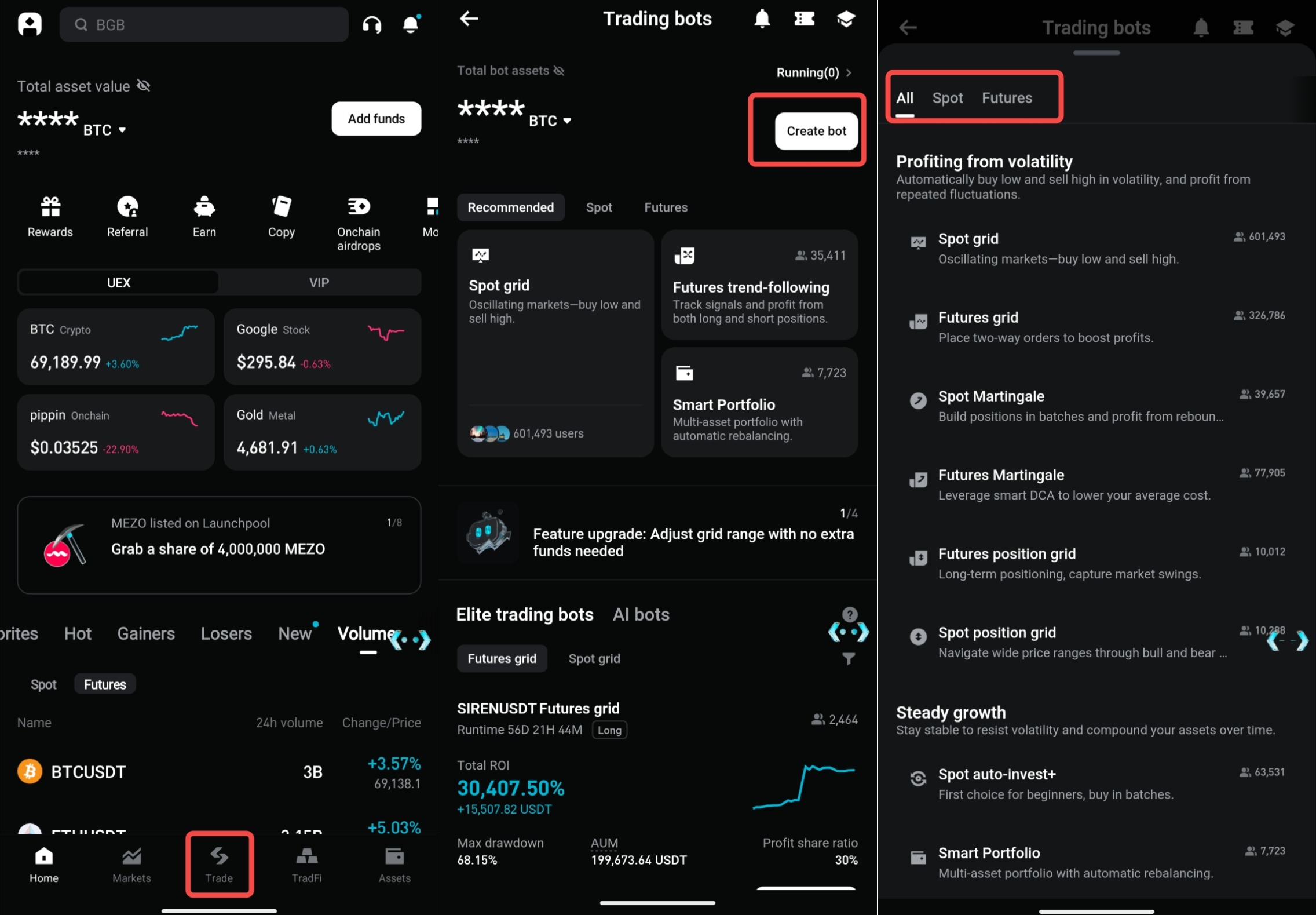
2. At the top of the screen, tap Bots.
Step 2: Open the bot trading menu
1. Tap Create bot from the top of the Bots section.
2. Browse the available bot strategies and select Futures Trend-following.
Step 3: Choose a trading pair and indicator
1. Choose your preferred trading pair (e.g., BTCUSDT) from the menu.
2. Select one of the available indicators: MACD, BOLL, MA, or RSI.
3. Select the bot configuration aligned with your pair and indicator.
4. Tap Use to proceed to the bot setup page.
Step 4: Configure parameters
1. Leverage settings:
-
Adjust the leverage multiplier to suit your strategy (e.g., 5x).
2. Margin requirements:
-
Ensure sufficient margin is available in your account.
3. Investment amount:
-
Enter the total USDT amount to allocate.
Step 5: Adjust advanced settings (optional)
1. Take-profit (%):
-
Set the profit percentage at which the bot will close the position (e.g., 5%).
2. Stop-loss (%):
-
Set the loss percentage at which the bot will close the position (e.g., 3%).
Step 6: Launch the bot
1. Review all settings, including the leverage, take-profit, stop-loss, and investment amount.
2. Confirm your balance meets the requirements.
3. Tap Create Order to activate the bot.
FAQ
1. What is the minimum investment required?
The minimum amount depends on the selected leverage and trading pair. Check the Margin field during setup.
2. Can I modify the bot after starting it?
Yes. You can pause the bot and adjust settings at any time through the My Bots dashboard.
3. What happens if the market moves against my position?
The bot will continue operating until you manually stop it or predefined termination conditions are triggered.
4. Can I use high leverage with the futures trend-following bot?
Yes, but higher leverage increases both potential returns and risk. Choose leverage according to your risk tolerance.
5. Are there additional fees for using the bot?
No additional fees are charged for using the bot. However, standard futures trading fees apply to executed trades
Disclaimer and Risk Warning
All trading tutorials provided by Bitget are for educational purposes only and should not be considered financial advice. The strategies and examples shared are for illustrative purposes and may not reflect actual market conditions. Cryptocurrency trading involves significant risks, including the potential loss of your funds. Past performance does not guarantee future results. Always conduct thorough research and understand the risks involved. Bitget is not responsible for any trading decisions made by users.
Join Bitget, the World's Leading Crypto Exchange and Web3 Company
*Ushbu e'lon vaqtga sezgir. Iltimos, e'lon qilingan sanaga e'tibor bering. Vaziyatning o'zgarishi yoki kontentning eskirishi natijasida yuzaga keladigan har qanday to'g'ridan-to'g'ri yoki bilvosita zarar uchun platforma javobgar emas.